

| Home | Log In | Register | Our Services | My Account | Contact | Help |
You are NOT currently logged in
Register now or login to post to this thread.
PC & MAC CLINIC - On line problem solving. (CPU)
Crocodile - 16 Dec 2002 03:59

ADAM

 - 12 Aug 2005 21:32
- 3508 of 11003
- 12 Aug 2005 21:32
- 3508 of 11003


If there is a glimmer of light then it sounds to me like one of your key components has gone. It will be either your memory, board or processor most probably.
How old was the system and was it AMD or Intel? i.e Pentium or Athlon?
How old was the system and was it AMD or Intel? i.e Pentium or Athlon?
Spaceman
 - 12 Aug 2005 22:33
- 3509 of 11003
- 12 Aug 2005 22:33
- 3509 of 11003

Breydon,
Could be bad but, I would open the case and check that none of the power connecters have come loose, the big one that plugs into the motherboard from the power supply could have worked loose, these are sometimes in hot areas and constant heating and cooling can loosen them. Check the other power supply connectors as well.
Power supply might have blown, its not easy to check them as they are SMPS systems and fairly hazardous to play with. Do you have another PC that you could borrow the power supply from?
good luck
Could be bad but, I would open the case and check that none of the power connecters have come loose, the big one that plugs into the motherboard from the power supply could have worked loose, these are sometimes in hot areas and constant heating and cooling can loosen them. Check the other power supply connectors as well.
Power supply might have blown, its not easy to check them as they are SMPS systems and fairly hazardous to play with. Do you have another PC that you could borrow the power supply from?
good luck
breydon
- 13 Aug 2005 09:32
- 3510 of 11003
Pentium
will try another power supply from old comp
thanks
how if i buy new comp can i read my old comps hard drive ?
Lesley
will try another power supply from old comp
thanks
how if i buy new comp can i read my old comps hard drive ?
Lesley
sutherlh1 - 13 Aug 2005 09:45 - 3511 of 11003
Norton antivirus has warned me of 2 non viral threats. It named them as gryyxxkq.exe and bgichfky.exe in the C;Documents and settings\owner\ application data\ files indicating they were lopware. I used the search facilities on my windows XP but couldn't find them on several occasions. The search did eventually find the first file and I deleted it. But I cannot find the second. I have adaware, spybot and AOL antispy ware all up to date as is Norton antivirsus and my microsoft updates. Any ideas appreciated how I could remove the second file, thanks
ADAM
- 13 Aug 2005 09:49
- 3512 of 11003
When you do your search, hit More Advanced Options and tick the "Search Hidden Files and Folders" box and carry out the search again.
ADAM
- 13 Aug 2005 09:53
- 3513 of 11003
Breydon,
Your old drive will be fine. What you can do is take it to your local PC world and they will transfer all the data onto a disk.
Either that or you could install your old drive into your new PC as a slave, but this can be complicated for a non technical user.
If you fancy it see:href="http://www.driverzone.com/guides/hd/install/hdinstall_p1.html" title="http://www.driverzone.com/guides/hd/install/hdinstall_p1.html">Installing 2nd Hard Drive
Make sure your old drive is set to slave.
Your old drive will be fine. What you can do is take it to your local PC world and they will transfer all the data onto a disk.
Either that or you could install your old drive into your new PC as a slave, but this can be complicated for a non technical user.
If you fancy it see:href="http://www.driverzone.com/guides/hd/install/hdinstall_p1.html" title="http://www.driverzone.com/guides/hd/install/hdinstall_p1.html">Installing 2nd Hard Drive
Make sure your old drive is set to slave.
Spaceman
- 13 Aug 2005 10:11
- 3514 of 11003
sutherlh1 won't Nortn clean these for you? it should tell you where it is at least even if it is hidden.
I normally switch off system restore when I am cleaning virus problems.
I normally switch off system restore when I am cleaning virus problems.
Dil
- 13 Aug 2005 10:16
- 3515 of 11003
What do I need to do to run two pc's from one broadband connection ?
Simplest solution please cos I'm a bit thick :-)
Cheers
Simplest solution please cos I'm a bit thick :-)
Cheers
Spaceman
- 13 Aug 2005 10:27
- 3516 of 11003
Dil, are they near each other? do they have ethernet ports?
Dil
- 13 Aug 2005 10:34
- 3517 of 11003
About 10 foot apart and whats an earthnet port ?
They are both less than two years old , one is a laptop if that helps.
They are both less than two years old , one is a laptop if that helps.
Spaceman
- 13 Aug 2005 10:57
- 3518 of 11003
I would go for a cheap router from somewhere like Ebuyer for example this one :-Example ADSL Router with Modem (I have not used that one but it shows what sort of thing you need). This box replaces the modedm you already have (which is probably a USB thing) It becomes responsible for the broadband connection, you plug each Pc ito it using an ethernet cable. (as your PCs are new you probably already have ethernet in them)
Spaceman
- 13 Aug 2005 11:00
- 3519 of 11003
Dil, Ethernet recognition picture ;-)

and another
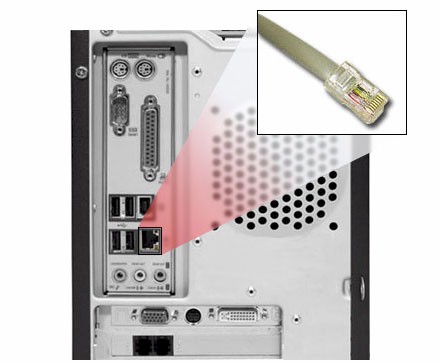
and another
optomistic
- 13 Aug 2005 11:48
- 3520 of 11003
Dil, when you have done yours please come and do mine. Had a so called expert to mine and he failed, not seen him since!
Dil
- 13 Aug 2005 12:35
- 3521 of 11003
Lol , cheers guys I'll have a look when the rugby finishes.
Dil
- 13 Aug 2005 13:19
- 3522 of 11003
Looks just the job , ordered one.
dorothyperkins - 14 Aug 2005 14:12 - 3523 of 11003
I have two pcs sharing one broadband connection
One is running an application which receives data via satellite
Is there any way I can remotely use that application from the other PC?
Thanks
dot
One is running an application which receives data via satellite
Is there any way I can remotely use that application from the other PC?
Thanks
dot
Velocity
- 14 Aug 2005 16:47
- 3524 of 11003
Do all adsl wireless routers work with all adsl ISP's?
Thanks
Thanks
ADAM
- 14 Aug 2005 17:33
- 3525 of 11003
Dorothy,
If the two PC's are connected. Also depends on the software as it might have restrictions to 1 user etc.
Velocity,
Should do, why are you having problems or thinking of ordering one?
If the two PC's are connected. Also depends on the software as it might have restrictions to 1 user etc.
Velocity,
Should do, why are you having problems or thinking of ordering one?
Velocity
- 14 Aug 2005 17:38
- 3526 of 11003
ADAM - Thanks for that, thinking of ordering one from Ebuyer.com, just wasn't sure whether it would work with my ISP, which is Pipex.
Kayak
- 14 Aug 2005 18:32
- 3527 of 11003
Dorothy, if you have Windows XP you can use Remote Desktop to see the desktop of the first PC from the second PC. That is assuming that your satellite box is connected via USB or is an internal card in the first PC. If it is connected via a network connection you might be able to access it directly from the second PC and therefore simply run the application from the second PC.
| About MoneyAM | Ts and Cs | Privacy Policy | Investment Warning | Content Standards | Corporate Solutions | Advertise With Us | Site Map | © 2026 MoneyAM |
Register now for FREE
Share Prices,
Stock Quotes,
Charts, Bulletin Boards, Indices, Watchlists, Portfolio, Market News, Research
or see our Premium Services including Level 2, Terminal and much more.
 Follow us on Twitter