

| Home | Log In | Register | Our Services | My Account | Contact | Help |
You are NOT currently logged in
Register now or login to post to this thread.
THE TALK TO YOURSELF THREAD. (NOWT)
goldfinger

 - 09 Jun 2005 12:25


Thought Id start this one going because its rather dead on this board at the moment and I suppose all my usual muckers are either at the Stella tennis event watching Dim Tim (lose again) or at Henly Regatta eating cucumber sandwiches (they wish,...NOT).
Anyway please feel free to just talk to yourself blast away and let it go on any company or subject you wish. Just wish Id thought of this one before.
cheers GF.
Anyway please feel free to just talk to yourself blast away and let it go on any company or subject you wish. Just wish Id thought of this one before.
cheers GF.
jimmy b
- 30 Jul 2015 14:29
- 61761 of 81564
I know a kid who can watch anything live including pay per view on his PC i don't know how but he does .
Fred1new
- 30 Jul 2015 14:32
- 61762 of 81564
He opens his eyes!
Try it!
Try it!
Haystack
- 30 Jul 2015 15:08
- 61763 of 81564
Jimmy
It is very easy. I might post up some links later
You can watch any film as well or you can download them to a USB stick and play them on your TV
It is very easy. I might post up some links later
You can watch any film as well or you can download them to a USB stick and play them on your TV
TANKER - 30 Jul 2015 15:21 - 61764 of 81564
I can watch anything I want on any of my 4 tvs .its all I the air
jimmy b
- 30 Jul 2015 15:28
- 61765 of 81564
Haystack after you had explained it 4760 times you would probably want to drown me !!!
Chris Carson
- 30 Jul 2015 15:52
- 61766 of 81564
Guess we can take it from Tankers pearls of wisdom that he is not long on Sky :0)
ExecLine
 - 30 Jul 2015 16:58
- 61767 of 81564
- 30 Jul 2015 16:58
- 61767 of 81564

Wow!
Just wait for the bus to get out of the way.....
Just wait for the bus to get out of the way.....
MaxK - 30 Jul 2015 18:08 - 61768 of 81564
English Electric Lightning done it years ago.
https://www.youtube.com/watch?v=_CDLbokf9sg&feature=player_detailpage
https://www.youtube.com/watch?v=_CDLbokf9sg&feature=player_detailpage
ExecLine
- 30 Jul 2015 20:06
- 61769 of 81564
Windows 10 gets 4.5/5 Stars Review

Windows 10 rights a lot of the Windows 8 wrongs which version 8.1 only put right in small part.
Here are the 5 Key Features of Windows 10
1. The new Start menu is split in two, with a list of commonly used applications and settings on the left hand side and Windows 8-style "live tiles" on the right, optimised for touch-based computing.
2. The Edge browser is includes a number of nifty features like Read Mode and Web Note, allowing users to read and interact with web pages in the way they want.
3. There is now a button on the taskbar that gives you a zoomed-out view of all the apps you have running, and lets you select the one you want or create multiple virtual desktops.
4. Microsoft's personal assistant, Cortana, also learns about you over time, such as the music you like and the sports teams you support, and proactively highlights relevant news and information from the web.
5. Unlike with previous versions of the operating system, Windows 10 works across all Microsoft devices, including PCs, tablets, smartphones.
I would think most people are going to use Edge as a browser for use on here.
If, like me, you stopped using Internet Explorer years ago, Microsoft's new web broswer, Edge, is a revelation. It feels more like the Google Chrome browser, with a light, stripped-back user interface and a simple set of tools along the top, under the search bar.
For example, "Favourites" lets you bookmark a page and cache it for reading offline, "Web Note" lets you annotate live pages and then save a screenshot of the page, and "Share Page" lets you send a link to friends via email or social network (or maybe even your mates on MoneyAM?).
Maybe you are going to have to go out and buy a microphone? Why? Well for the new Cortana.
This is Microsoft's new Windows 10 'virtual personal assistant' which appears as a search box on the task bar. You can either type queries into the search box or issue voice commands by saying "Hey Cortana," and then asking a question. That will be a bit of fun (or not?). Hmmm?
To start with, at least, most people will use Cortana just as they would any other search function. Questions like "How old is Harrison Ford?" or "How do I get to Buckingham Palace?" will return responses from Bing search. However, Cortana is designed to be cleverer than that.
If you give her access to your email and calendar clients, for example, she can start to act more like a real personal assistant, extracting relevant information and proactively offering information.
So, in theory, if you have been discussing a particular airline flight in an email, and that flight is delayed, Cortana will alert you to the delay. Or of you have a meeting across town and there is heavy traffic, it will tell you when you need to leave to avoid being late.
(Hmmm? Is this stuff for real? Hmmm?) Hey, 'this just has to be' and is sure to get more and more refined as the years go by.
Windows Media Center has gone.
Awww! Anyway, it has been replaced with modified versions of Xbox Music and Xbox Video, which have been renamed as 'Groove' and 'Movies & TV' respectively, and a built-in Xbox app, that offers a unified view of your games, the activity of your friends, and your own gaming activities.
These all feel much more slick and modern than the clunky old Windows Media Center app, which was essentially built for offline media consumption. You can stream and download music and videos and import your own collections to make all your music accessible in one place. Of course if you use third party streaming apps like Spotify or Netflix, these will have to be downloaded separately.
Problems?
Well, just remember that there are 4.4 million Windows 10 'insiders' out there who are continuously monitoring and providing feedbackon bugs and glitches, and the ability to issue regular updates over-the-air, Microsoft could not be in a better position to give customers the Windows experience they have long been hoping for.
I am personally extremely optimistic about it and am going to be 'in ASAP' on Windows 10. I do think it's going to be OK and that we'll like it.
One Key Feature we are bound to like on here is going to be the ability to run multiple "desktops" side by side, which is the virtual equivalent of having mutiple PC monitors with different apps open on each screen. It's quite a niche feature, but one that some people will no doubt find useful. You can also "snap" applications that are open to different corners of the screen to make them easier to view.
Here's what it might look like:

Windows 10 rights a lot of the Windows 8 wrongs which version 8.1 only put right in small part.
Here are the 5 Key Features of Windows 10
1. The new Start menu is split in two, with a list of commonly used applications and settings on the left hand side and Windows 8-style "live tiles" on the right, optimised for touch-based computing.
2. The Edge browser is includes a number of nifty features like Read Mode and Web Note, allowing users to read and interact with web pages in the way they want.
3. There is now a button on the taskbar that gives you a zoomed-out view of all the apps you have running, and lets you select the one you want or create multiple virtual desktops.
4. Microsoft's personal assistant, Cortana, also learns about you over time, such as the music you like and the sports teams you support, and proactively highlights relevant news and information from the web.
5. Unlike with previous versions of the operating system, Windows 10 works across all Microsoft devices, including PCs, tablets, smartphones.
I would think most people are going to use Edge as a browser for use on here.
If, like me, you stopped using Internet Explorer years ago, Microsoft's new web broswer, Edge, is a revelation. It feels more like the Google Chrome browser, with a light, stripped-back user interface and a simple set of tools along the top, under the search bar.
For example, "Favourites" lets you bookmark a page and cache it for reading offline, "Web Note" lets you annotate live pages and then save a screenshot of the page, and "Share Page" lets you send a link to friends via email or social network (or maybe even your mates on MoneyAM?).
Maybe you are going to have to go out and buy a microphone? Why? Well for the new Cortana.
This is Microsoft's new Windows 10 'virtual personal assistant' which appears as a search box on the task bar. You can either type queries into the search box or issue voice commands by saying "Hey Cortana," and then asking a question. That will be a bit of fun (or not?). Hmmm?
To start with, at least, most people will use Cortana just as they would any other search function. Questions like "How old is Harrison Ford?" or "How do I get to Buckingham Palace?" will return responses from Bing search. However, Cortana is designed to be cleverer than that.
If you give her access to your email and calendar clients, for example, she can start to act more like a real personal assistant, extracting relevant information and proactively offering information.
So, in theory, if you have been discussing a particular airline flight in an email, and that flight is delayed, Cortana will alert you to the delay. Or of you have a meeting across town and there is heavy traffic, it will tell you when you need to leave to avoid being late.
(Hmmm? Is this stuff for real? Hmmm?) Hey, 'this just has to be' and is sure to get more and more refined as the years go by.
Windows Media Center has gone.
Awww! Anyway, it has been replaced with modified versions of Xbox Music and Xbox Video, which have been renamed as 'Groove' and 'Movies & TV' respectively, and a built-in Xbox app, that offers a unified view of your games, the activity of your friends, and your own gaming activities.
These all feel much more slick and modern than the clunky old Windows Media Center app, which was essentially built for offline media consumption. You can stream and download music and videos and import your own collections to make all your music accessible in one place. Of course if you use third party streaming apps like Spotify or Netflix, these will have to be downloaded separately.
Problems?
Well, just remember that there are 4.4 million Windows 10 'insiders' out there who are continuously monitoring and providing feedbackon bugs and glitches, and the ability to issue regular updates over-the-air, Microsoft could not be in a better position to give customers the Windows experience they have long been hoping for.
I am personally extremely optimistic about it and am going to be 'in ASAP' on Windows 10. I do think it's going to be OK and that we'll like it.
One Key Feature we are bound to like on here is going to be the ability to run multiple "desktops" side by side, which is the virtual equivalent of having mutiple PC monitors with different apps open on each screen. It's quite a niche feature, but one that some people will no doubt find useful. You can also "snap" applications that are open to different corners of the screen to make them easier to view.
Here's what it might look like:
MaxK - 30 Jul 2015 20:26 - 61770 of 81564
Is it true that all your activities are reported to MS on a routine basis under this O/S?
Haystack
- 30 Jul 2015 20:51
- 61771 of 81564
One of the changes is that you have no choice as to whether you accept updates. Only business users can turn of automatic updates.
MaxK - 30 Jul 2015 23:14 - 61772 of 81564
It's not updates, it's data mining.
Is the new system downloading your activities, with or without your knowledge?
Is the new system downloading your activities, with or without your knowledge?
TANKER - 31 Jul 2015 07:20 - 61773 of 81564
Harman is destroying the labour party she is the best supporter of the conservative party , she is a fcuking dimwit
TANKER - 31 Jul 2015 07:32 - 61774 of 81564
looking forward to the cricket this morning
Fred1new
- 31 Jul 2015 08:44
- 61775 of 81564
After strutting around Captain Marvel has returned to the hive for an emergency meeting with a cobra!
Europe can rest in peace!
Europe can rest in peace!
TANKER - 31 Jul 2015 09:00 - 61776 of 81564
send in the army round them all up and put them on a boat back home .
we do not want any more scum beggars that is all they are they fight the police
but will not fight back home to make it better they are scum criminals . ever illegal should be rounded up and deported .
we do not want any more scum beggars that is all they are they fight the police
but will not fight back home to make it better they are scum criminals . ever illegal should be rounded up and deported .
TANKER - 31 Jul 2015 09:03 - 61777 of 81564
Harman destroying the party great supporter of the con party
Cameron should give her the highest medal for being the top supporter
stupid woman a dam idiot fcuking up the labour party
Cameron should give her the highest medal for being the top supporter
stupid woman a dam idiot fcuking up the labour party
TANKER - 31 Jul 2015 11:00 - 61778 of 81564
set up water cannons on the fences
TANKER - 31 Jul 2015 11:15 - 61779 of 81564
cricket England will lose the 3rd test get a bet on now
Haystack
- 31 Jul 2015 11:19
- 61780 of 81564
Bad news for a few on here.
British support for staying in the European Union has now been in positive territory for 7 months
From January to July 2015 British support for remaining a member of the EU has been in unbroken positive territory. This is the longest sustained period of support since the question was first asked on our EuroTrack survey in February 2012.
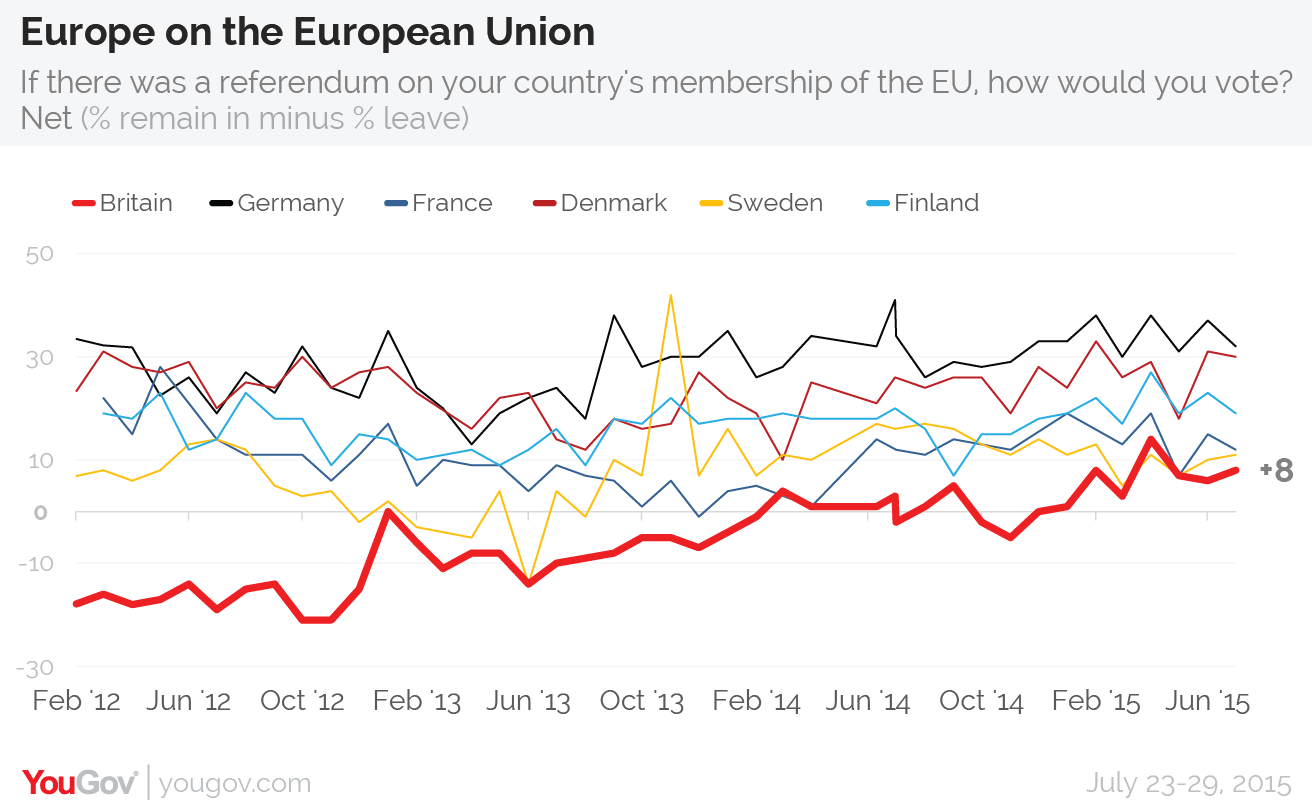
British support for staying in the European Union has now been in positive territory for 7 months
From January to July 2015 British support for remaining a member of the EU has been in unbroken positive territory. This is the longest sustained period of support since the question was first asked on our EuroTrack survey in February 2012.
| About MoneyAM | Ts and Cs | Privacy Policy | Investment Warning | Content Standards | Corporate Solutions | Advertise With Us | Site Map | © 2026 MoneyAM |
Register now for FREE
Share Prices,
Stock Quotes,
Charts, Bulletin Boards, Indices, Watchlists, Portfolio, Market News, Research
or see our Premium Services including Level 2, Terminal and much more.
 Follow us on Twitter